Contributing to this Wiki
Thanks for considering a contribution! You'll need:
- A GitHub account
- Git installed
- Zensical installed for local preview (
pip install zensical, or use a conda environment) - Basic Markdown syntax knowledge
1. Fork and clone the repo
Fork pennsive/pennsive.github.io (button in the upper-right corner):

Then clone your fork:
git clone https://github.com/<your-username>/pennsive.github.io
cd pennsive.github.io
2. Track the upstream repo
git remote add upstream https://github.com/pennsive/pennsive.github.io.git
This lets you pull in changes made to the wiki after you forked it.
3. Create a branch
git checkout -b <descriptive-branch-name>
Don't work directly on main — it needs to stay in sync with upstream.
4. Write your page
Create a new file under docs/, named in lowercase with hyphens or underscores (e.g. docs/my-topic.md).
To keep every page consistent:
- Start with a single
#heading for the page title. Use##/###below it in order, without skipping levels, to ensure consistent generation of table of contents. -
Add author/date frontmatter at the very top of the file:
---
author: "Your Name"
date: yyyy-mm-dd
---
Update the
datewhenever you make a substantial edit to an existing page. -
Tag code blocks with a language, e.g.
```sh,```python,```r,```yaml. Don't use Quarto/knitr chunk syntax. - Put images in
docs/images/my-topic/and reference them with a relative path:. - Link to other wiki pages by their filename:
[project setup guide](projects.md). Zensical resolves.mdlinks to the right page automatically. -
Use admonitions for callouts if useful, paying attention to the indentation. For example:
!!! note
    This is a tip.
5. Add your page to the navigation and the Welcome page
Pages don't appear automatically. You will need to add an entry to the nav list in zensical.toml, under whichever top-level section it belongs to:
{ "Computing Basics" = [
  ...
  { "My Topic" = "my-topic.md" },
] },
Similarly, add a link to your page in the appropriate section of docs/index.md so that it appears on the Welcome page.
Important
docs/index.md is written as raw HTML, not Markdown. Use a plain HTML link:
<li><a href="my-topic.md">My Topic</a></li>
6. Add your name and photo to the Welcome page
As an acknowledgment, we encourage you to add your name and photo to the contributors list in the Welcome page. To do so, first upload your photo to docs/images/contributors/ and then open docs/index.md. Scroll to near the bottom of the file, and then add to the following section:
<div class="contributors">
  <!-- existing contributors -->
  <!-- ... -->
  <div class="contributor" data-name="Your Name">
    <img src="../images/contributors/your-photo.jpeg">
  </div>
  <!-- ... -->

</div>
Please insert your entry in alphabetical order by last name.
7. Preview locally
Activate the environment where you installed Zensical, and change the working directory to pennsive.github.io. Then, run:
zensical serve
or
./run.sh
Open http://localhost:8000 using your web browser. Now, you can preview the website and check your page in both light and dark mode.
8. Commit and open a pull request (PR)
cd pennsive.github.io
git add .
git commit -m "Add page on <my-topic>"
git push origin <your-branch-name>
If upstream/main has moved on since you branched:
git fetch upstream main
git checkout main && git pull upstream main
git checkout <your-branch-name> && git merge main
Then open a pull request from your fork on GitHub:
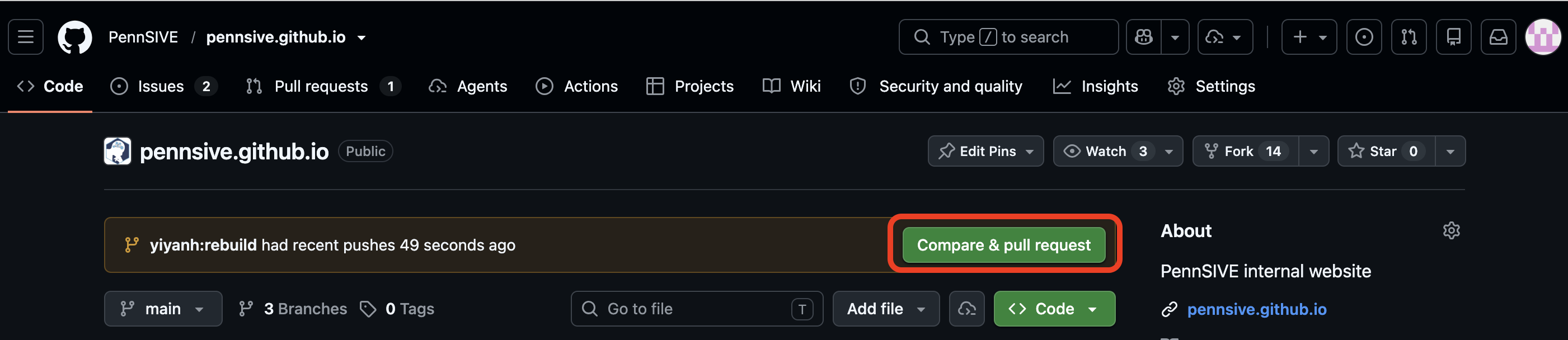
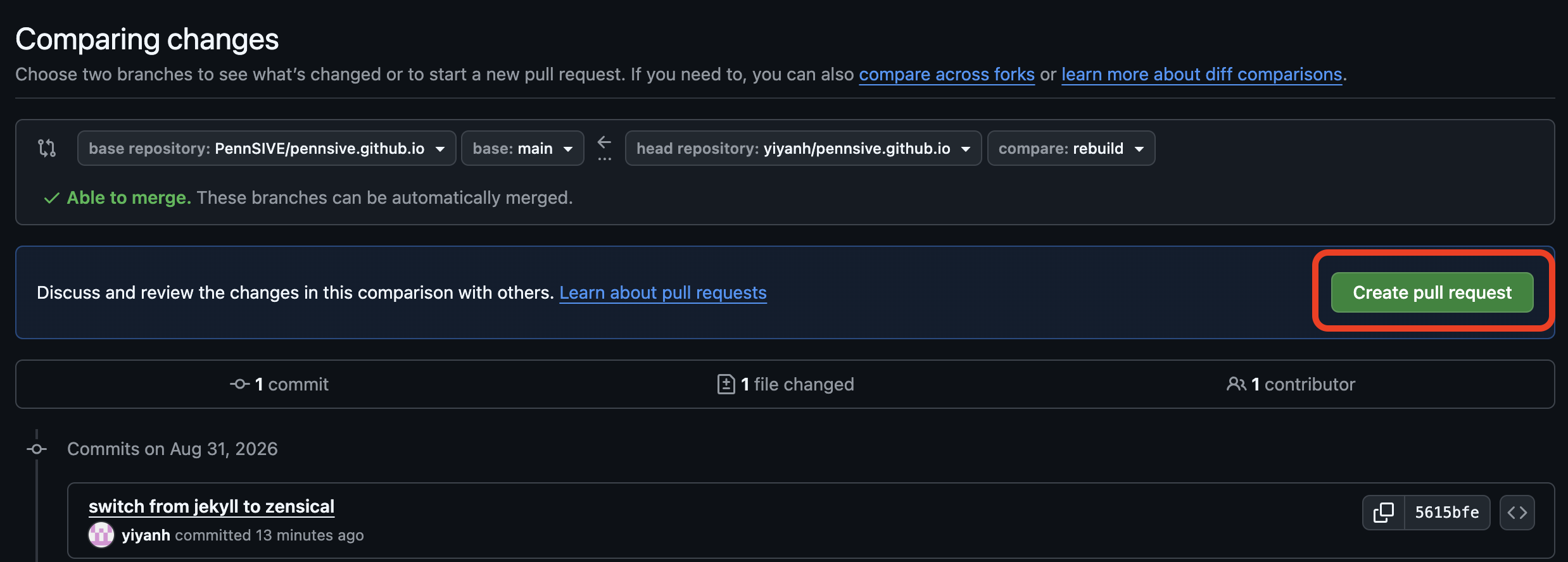
Make sure that your branch is being compared against pennsive/pennsive.github.io's main. If you can't see your branch as an option, click on "compare across forks":

Click on "create pull request" after you have selected the correct branches:
Describe your changes, and submit:
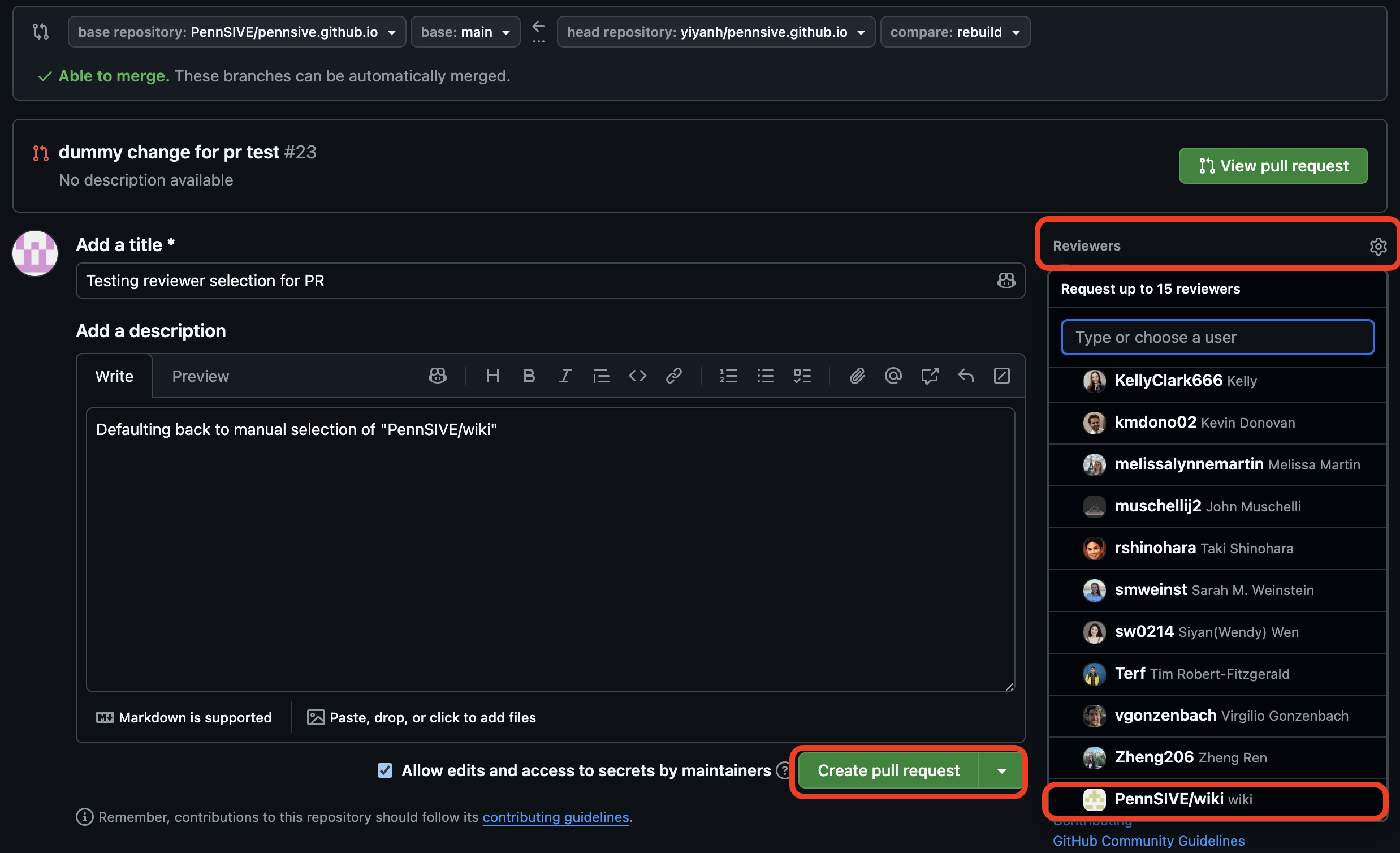
The wiki team will automatically be requested as a reviewer once you submit. If it doesn't show up under Reviewers in the sidebar, let the wiki team know via Slack.
If you need to make changes before the PR gets reviewed, just commit and push to your branch again. The PR will update automatically.
After the wiki group reviews and approves your PR, you will be able to merge it into main. If this option is not available, the reviewer will merge it for you.
Congratulations
You've made a contribution to the PennSIVE wiki! We appreciate it :)